Hello everyone, in this article I’ll discuss about how to configure intervlan routing on router cisco. Refers on the topology above, we have plan to configure two network vlan 10 and vlan 20 and based on this topology we only connect between the PCs that connect to the same vlan. it can’t connecting beetween vlan 10 through vlan 20.
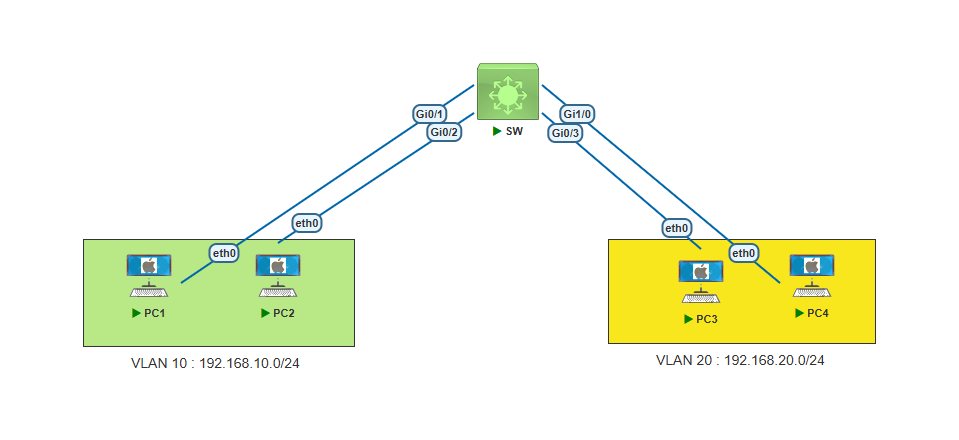
Let’s try the initial topology :
Configure on SW
Create vlan 10 and vlan 20
SW(config)#vlan 10
SW(config-vlan)#name V-10
SW(config-vlan)#exit
SW(config)#vlan 20
SW(config-vlan)#name V-20
SW(config-vlan)#exit
Configure switch port access for PC’s that connect to Vlan 10 and Vlan 20.
SW(config)#int range g0/1-2
SW(config-if-range)#switchport mode access
SW(config-if-range)#switchport access vlan 10
SW(config-if-range)#exit
SW(config)#int g0/3
SW(config-if)#switchport mode access
SW(config-if)#switchport access vlan 20
SW(config-if)#exit
SW(config)#int g1/0
SW(config-if)#switchport mode access
SW(config-if)#switchport access vlan 20
SW(config-if)#exit
Now Configure IP Address on each PCs with gateway ip 254 for each vlan segmen.
PC1> ip 192.168.10.1/24 192.168.10.254
Checking for duplicate address...
PC1 : 192.168.10.1 255.255.255.0 gateway 192.168.10.254
PC2> ip 192.168.10.2/24 192.168.10.254 Checking for duplicate address... PC1 : 192.168.10.2 255.255.255.0 gateway 192.168.10.254PC4> ip 192.168.20.4/24 192.168.20.254 Checking for duplicate address... PC1 : 192.168.20.4 255.255.255.0 gateway 192.168.20.254PC3> ip 192.168.20.3/24 192.168.20.254 Checking for duplicate address... PC1 : 192.168.20.3 255.255.255.0 gateway 192.168.20.254
Ping test from PC1 to PC2 which is the same vlan is success to connecting.
PC1> ping 192.168.10.2
84 bytes from 192.168.10.2 icmp_seq=1 ttl=64 time=2.100 ms
84 bytes from 192.168.10.2 icmp_seq=2 ttl=64 time=1.540 ms
84 bytes from 192.168.10.2 icmp_seq=3 ttl=64 time=1.535 ms
84 bytes from 192.168.10.2 icmp_seq=4 ttl=64 time=1.175 ms
84 bytes from 192.168.10.2 icmp_seq=5 ttl=64 time=2.720 ms
PC1>
Ping test from PC3 to PC4 which is the same vlan is success to connecting.
PC3> ping 192.168.20.4
84 bytes from 192.168.20.4 icmp_seq=1 ttl=64 time=1.242 ms
84 bytes from 192.168.20.4 icmp_seq=2 ttl=64 time=1.454 ms
84 bytes from 192.168.20.4 icmp_seq=3 ttl=64 time=1.491 ms
84 bytes from 192.168.20.4 icmp_seq=4 ttl=64 time=1.618 ms
84 bytes from 192.168.20.4 icmp_seq=5 ttl=64 time=1.364 ms
PC3>
But if we try to cross connection betweeen vlan, it will fail to connect.
PC1> ping 192.168.20.3
host (192.168.10.254) not reachable
PC1>
PC3> ping 192.168.20.1 host (192.168.20.1) not reachable PC3>
So based on the configuration above, we need to add device that function for forward the connection between vlans. it’s called intervlan routing or Router on Stick.
Add a router device on the existing topology and connect to the SW port.
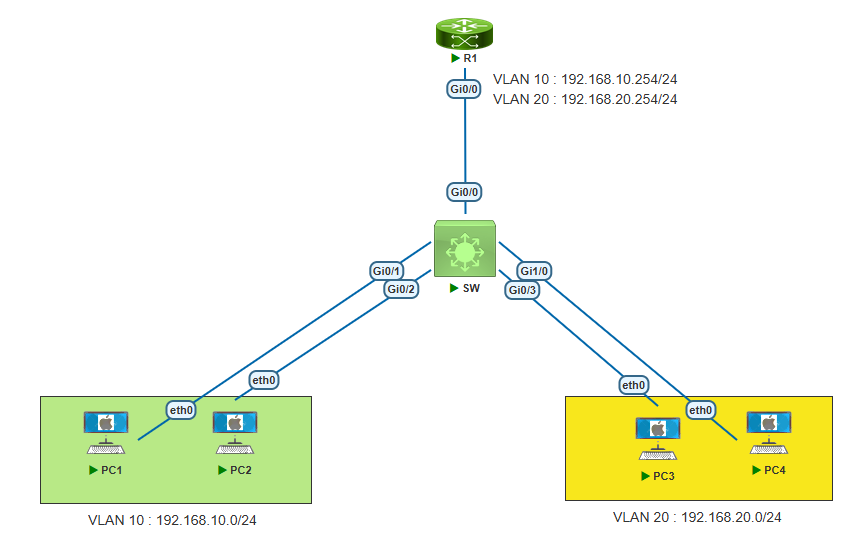
Configure Port G0/0 on SW as trunk port
SW(config)#int g0/0
SW(config-if)#switchport trunk encapsulation dot1q
SW(config-if)#switchport mode trunk
SW(config-if)#exit
SW(config)#
Configure on R1
Enable interface g0/0 first.
R1(config)#int g0/0
R1(config-if)#no shutdown
R1(config-if)#exit
R1(config)#
Then configure sub interface for vlan 10.
R1(config)#int g0/0.10
R1(config-subif)#encapsulation dot1Q 10
R1(config-subif)#ip address 192.168.10.254 255.255.255.0
R1(config-subif)#no shut
R1(config-subif)#exit
Configure sub interface for vlan 20
R1(config)#int g0/0.20
R1(config-subif)#encapsulation dot1Q 20
R1(config-subif)#ip address 192.168.20.254 255.255.255.0
R1(config-subif)#no shut
R1(config-subif)#exit
R1(config)#
show interface configuration to makesure sub interface is already up.
R1#show ip int brief
Interface             IP-Address     OK? Method Status Protocol
GigabitEthernet0/0    unassigned     YES unset    up      up
GigabitEthernet0/0.10 192.168.10.254 YES manual   up      up
GigabitEthernet0/0.20 192.168.20.254 YES manual   up      up
Now ping test from PC1 to gateway ip vlan 10 and IP PC3 on vlan 20. Ping test is successfull.
PC1> ping 192.168.10.254
84 bytes from 192.168.10.254 icmp_seq=1 ttl=255 time=2.620 ms
84 bytes from 192.168.10.254 icmp_seq=2 ttl=255 time=2.929 ms
84 bytes from 192.168.10.254 icmp_seq=3 ttl=255 time=2.390 ms
84 bytes from 192.168.10.254 icmp_seq=4 ttl=255 time=2.833 ms
84 bytes from 192.168.10.254 icmp_seq=5 ttl=255 time=3.020 ms
PC1> ping 192.168.20.3
84 bytes from 192.168.20.3 icmp_seq=1 ttl=63 time=7.929 ms
84 bytes from 192.168.20.3 icmp_seq=2 ttl=63 time=4.885 ms
84 bytes from 192.168.20.3 icmp_seq=3 ttl=63 time=5.712 ms
84 bytes from 192.168.20.3 icmp_seq=4 ttl=63 time=4.768 ms
84 bytes from 192.168.20.3 icmp_seq=5 ttl=63 time=4.358 ms
PC1>
Now ping test from PC3 to gateway ip vlan 10 and IP PC1 on vlan 10. Ping test is successfull.
PC3> ping 192.168.20.254
84 bytes from 192.168.20.254 icmp_seq=1 ttl=255 time=2.926 ms
84 bytes from 192.168.20.254 icmp_seq=2 ttl=255 time=3.461 ms
84 bytes from 192.168.20.254 icmp_seq=3 ttl=255 time=2.428 ms
84 bytes from 192.168.20.254 icmp_seq=4 ttl=255 time=3.004 ms
84 bytes from 192.168.20.254 icmp_seq=5 ttl=255 time=3.829 ms
PC3> ping 192.168.10.1
84 bytes from 192.168.10.1 icmp_seq=1 ttl=63 time=3.375 ms
84 bytes from 192.168.10.1 icmp_seq=2 ttl=63 time=4.376 ms
84 bytes from 192.168.10.1 icmp_seq=3 ttl=63 time=3.372 ms
84 bytes from 192.168.10.1 icmp_seq=4 ttl=63 time=3.959 ms
84 bytes from 192.168.10.1 icmp_seq=5 ttl=63 time=4.446 ms
PC3>
Show ip ARP on R1
R1#show ip arp
Protocol Address Age (min) Hardware Addr Type Interface
Internet 192.168.10.1 1 0050.7966.6877 ARPA GigabitEthernet0/0.10
Internet 192.168.10.254 - 50ef.9b00.7b00 ARPA GigabitEthernet0/0.10
Internet 192.168.20.3 1 0050.7966.6879 ARPA GigabitEthernet0/0.20
Internet 192.168.20.254 - 50ef.9b00.7b00 ARPA GigabitEthernet0/0.20
R1#