Vlan Trunking protocol is a Cisco Proprietary feature, this layer 2 messaging protocol is used to manage and syncronize VLAN Configuration for the Cisco Switch. When we configure the VTP, there are 3 Operation modes that must be known.
- Server Mode : This a default mode of VTP. Switch that act as VTP Server can create, modify and delete VLANs and also adversite the vlan database to other switches.
- Client Mode : VTP Client can only receive updates and syncronize a VLAN databases from VTP Server.
- Transparent Mode : in this Mode the switches do not participate in VTP Synchorization databases. But still forward VTP advertisements to other switch.
This is the topology used :
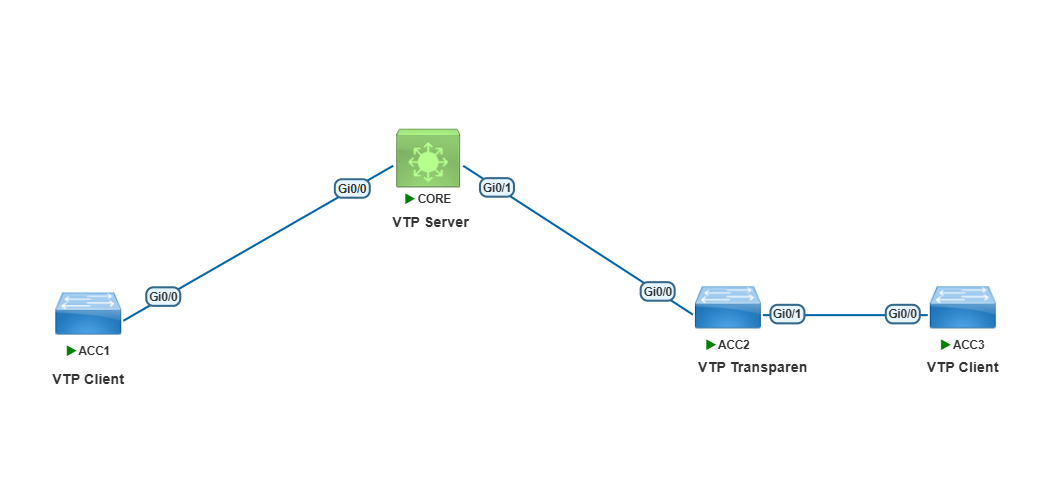
The First Step, configure a trunk on all switches connected ports
CORE(config)#int range g0/0-1
CORE(config-if-range)#switchport trunk encapsulation dot1q
CORE(config-if-range)#switchport mode trunk
CORE(config-if-range)#end
CORE#
ACC1(config-if)#switchport trunk encapsulation dot1q ACC1(config-if)#switchport mode trunk ACC1(config-if)#end ACC1#ACC2(config)#int range g0/0-1 ACC2(config-if-range)#switchport trunk encapsulation dot1q ACC2(config-if-range)#switchport mode trunk ACC2(config-if-range)#end ACC2#ACC3(config)#int g0/0 ACC3(config-if)#switchport trunk encapsulation dot1q ACC3(config-if)#switchport mode trunk ACC3(config-if)#end ACC3#
Then Configure CORE switch as VTP Server
CORE(config)#vtp mode server
CORE(config)#vtp domain taufiknurhuda.web.id
CORE(config)#
show the configuration with show vtp status command
CORE#show vtp status
VTP Version capable : 1 to 3
VTP version running : 1
VTP Domain Name : taufiknurhuda.web.id
VTP Pruning Mode : Disabled
VTP Traps Generation : Disabled
Device ID : 50d4.e600.8000
Configuration last modified by 0.0.0.0 at 5-11-26 08:46:32
Local updater ID is 0.0.0.0 (no valid interface found)

Feature VLAN:
--------------
VTP Operating Mode : Server
Maximum VLANs supported locally : 1005
Number of existing VLANs : 5
Configuration Revision : 1
MD5 digest : 0xF4 0xAB 0x88 0xA5 0xD6 0xF0 0x48 0x1D
0xD1 0xF3 0xBF 0xBC 0xCE 0xEF 0xAE 0x09
CORE#
After that configure vtp on the ACC1-3 switch bases on the topology above
Configure vtp client on ACC1 switch with the same domain as CORE switch.
ACC1(config)#vtp mode client
ACC1(config)#vtp domain taufiknurhuda.web.id
ACC1(config)#exit
ACC1#
Configure vtp transparent on ACC2 switch with the different domain as CORE switch.
ACC2(config)#vtp mode transparent
Setting device to VTP Transparent mode for VLANS.
ACC2(config)#vtp domain taufiknurhuda
Changing VTP domain name from in to taufiknurhuda
Configure vtp client on ACC3 switch with the same domain as CORE switch.
ACC3(config)#vtp mode client
Setting device to VTP Client mode for VLANS.
ACC3(config)#vtp domain taufiknurhuda.web.id
Changing VTP domain name from NULL to taufiknurhuda.web.id
ACC3(config)#
Show Vtp status on ACC1 – 3 switches
ACC1#show vtp status
VTP Version capable : 1 to 3
VTP version running : 1
VTP Domain Name : taufiknurhuda.web.id
VTP Pruning Mode : Disabled
VTP Traps Generation : Disabled
Device ID : 50ed.b100.8000
Configuration last modified by 0.0.0.0 at 0-0-00 00:00:00

Feature VLAN:
--------------
VTP Operating Mode : Client
Maximum VLANs supported locally : 1005
Number of existing VLANs : 5
Configuration Revision : 0
MD5 digest : 0xB6 0x9B 0x46 0x28 0xB7 0x53 0x69 0x76
0x5B 0x41 0x26 0x78 0xEA 0x0A 0x08 0xA8
ACC1#
ACC2#show vtp status
VTP Version capable : 1 to 3
VTP version running : 1
VTP Domain Name : taufiknurhuda
VTP Pruning Mode : Disabled
VTP Traps Generation : Disabled
Device ID : 506f.8300.8000
Configuration last modified by 0.0.0.0 at 0-0-00 00:00:00

Feature VLAN:
--------------
VTP Operating Mode : Transparent
Maximum VLANs supported locally : 1005
Number of existing VLANs : 5
Configuration Revision : 0
MD5 digest : 0x1B 0x9A 0xA9 0x42 0xFC 0x83 0xDC 0x60
0xF0 0xF7 0x4A 0x66 0x03 0xCC 0xEA 0x24
ACC2#
ACC3#show vtp status
VTP Version capable : 1 to 3
VTP version running : 1
VTP Domain Name : taufiknurhuda.web.id
VTP Pruning Mode : Disabled
VTP Traps Generation : Disabled
Device ID : 50ad.df00.8000
Configuration last modified by 0.0.0.0 at 0-0-00 00:00:00

Feature VLAN:
--------------
VTP Operating Mode : Client
Maximum VLANs supported locally : 1005
Number of existing VLANs : 5
Configuration Revision : 0
MD5 digest : 0xB6 0x9B 0x46 0x28 0xB7 0x53 0x69 0x76
0x5B 0x41 0x26 0x78 0xEA 0x0A 0x08 0xA8
ACC3#
Now test to add some VLAN on CORE switch.
After that verify vlan database and vtp status. you can see the Number of existing vlan on vtp status is updated.
CORE#config t
Enter configuration commands, one per line. End with CNTL/Z.
CORE(config)#vlan 1-5
CORE(config-vlan)#end
CORE#
CORE#show vlan brief VLAN Name Status Ports ---- -------------------------------- --------- ------------------------------- 1 default active Gi0/2, Gi0/3, Gi1/0, Gi1/1 Gi1/2, Gi1/3 2 VLAN0002 active 3 VLAN0003 active 4 VLAN0004 active 5 VLAN0005 active 1002 fddi-default act/unsup 1003 token-ring-default act/unsup 1004 fddinet-default act/unsup 1005 trnet-default act/unsup CORE#CORE#show vtp status VTP Version capable : 1 to 3 VTP version running : 1 VTP Domain Name : taufiknurhuda.web.id VTP Pruning Mode : Disabled VTP Traps Generation : Disabled Device ID : 5090.ca00.8000 Configuration last modified by 0.0.0.0 at 5-13-26 04:19:12 Local updater ID is 0.0.0.0 (no valid interface found) Feature VLAN: -------------- VTP Operating Mode : Server Maximum VLANs supported locally : 1005 Number of existing VLANs : 9 Configuration Revision : 1 MD5 digest : 0xFE 0x08 0x04 0xA1 0x76 0xE0 0x0D 0xCC 0x08 0x92 0x61 0x66 0x44 0xA9 0xA3 0x4A CORE#
Verify on SW1. on VLAN database and vtp status you can see the vlan is already sync and update to VTP Server
ACC1#show vlan brief

VLAN Name Status Ports
---- -------------------------------- --------- -------------------------------
1 default active Gi0/1, Gi0/2, Gi0/3, Gi1/0
Gi1/1, Gi1/2, Gi1/3
2 VLAN0002 active
3 VLAN0003 active
4 VLAN0004 active
5 VLAN0005 active
1002 fddi-default act/unsup
1003 token-ring-default act/unsup
1004 fddinet-default act/unsup
1005 trnet-default act/unsup

ACC1#show vtp status
VTP Version capable : 1 to 3
VTP version running : 1
VTP Domain Name : taufiknurhuda.web.id
VTP Pruning Mode : Disabled
VTP Traps Generation : Disabled
Device ID : 50ed.b100.8000
Configuration last modified by 0.0.0.0 at 5-13-26 04:19:12

Feature VLAN:
--------------
VTP Operating Mode : Client
Maximum VLANs supported locally : 1005
Number of existing VLANs : 9
Configuration Revision : 1
MD5 digest : 0xFE 0x08 0x04 0xA1 0x76 0xE0 0x0D 0xCC
0x08 0x92 0x61 0x66 0x44 0xA9 0xA3 0x4A
ACC1#
Verify on SW2. on the vlan database and vtp status you can see vlan is not sync because the switch is act as transparent mode.
ACC2#show vlan brief

VLAN Name Status Ports
---- -------------------------------- --------- -------------------------------
1 default active Gi0/2, Gi0/3, Gi1/0, Gi1/1
Gi1/2, Gi1/3
1002 fddi-default act/unsup
1003 token-ring-default act/unsup
1004 fddinet-default act/unsup
1005 trnet-default act/unsup

ACC2#show vtp status
VTP Version capable : 1 to 3
VTP version running : 1
VTP Domain Name : taufiknurhuda
VTP Pruning Mode : Disabled
VTP Traps Generation : Disabled
Device ID : 506f.8300.8000
Configuration last modified by 0.0.0.0 at 0-0-00 00:00:00

Feature VLAN:
--------------
VTP Operating Mode : Transparent
Maximum VLANs supported locally : 1005
Number of existing VLANs : 5
Configuration Revision : 0
MD5 digest : 0x1B 0x9A 0xA9 0x42 0xFC 0x83 0xDC 0x60
0xF0 0xF7 0x4A 0x66 0x03 0xCC 0xEA 0x24
ACC2#
Verify on SW3. The VLAN database and vtp status is not sync and updated yet even the vtp domain is same. why is that ?
ACC3#show vlan brief

VLAN Name Status Ports
---- -------------------------------- --------- -------------------------------
1 default active Gi0/1, Gi0/2, Gi0/3, Gi1/0
Gi1/1, Gi1/2, Gi1/3
1002 fddi-default act/unsup
1003 token-ring-default act/unsup
1004 fddinet-default act/unsup
1005 trnet-default act/unsup

ACC3#show vtp status
VTP Version capable : 1 to 3
VTP version running : 1
VTP Domain Name : taufiknurhuda.web.id
VTP Pruning Mode : Disabled
VTP Traps Generation : Disabled
Device ID : 50ad.df00.8000
Configuration last modified by 0.0.0.0 at 0-0-00 00:00:00

Feature VLAN:
--------------
VTP Operating Mode : Client
Maximum VLANs supported locally : 1005
Number of existing VLANs : 5
Configuration Revision : 0
MD5 digest : 0xB6 0x9B 0x46 0x28 0xB7 0x53 0x69 0x76
0x5B 0x41 0x26 0x78 0xEA 0x0A 0x08 0xA8
ACC3#
As you can see on ACC2 vtp domain is the taufiknurhuda, because the vtp domain on VTP server/core switch is taufiknurhuda.web.id that is not same so the ACC2 will not forward the VTP syncronization to ACC3. Let’s change vtp domain on ACC2 and verify again.
ACC2#config t
Enter configuration commands, one per line. End with CNTL/Z.
ACC2(config)#vtp domain taufiknurhuda.web.id
Changing VTP domain name from taufiknurhuda to taufiknurhuda.web.id
ACC2(config)#end
ACC2#show vtp status VTP Version capable : 1 to 3 VTP version running : 1 VTP Domain Name : taufiknurhuda.web.id VTP Pruning Mode : Disabled VTP Traps Generation : Disabled Device ID : 506f.8300.8000 Configuration last modified by 0.0.0.0 at 0-0-00 00:00:00 Feature VLAN: -------------- VTP Operating Mode : Transparent Maximum VLANs supported locally : 1005 Number of existing VLANs : 5 Configuration Revision : 0 MD5 digest : 0xB6 0x9B 0x46 0x28 0xB7 0x53 0x69 0x76 0x5B 0x41 0x26 0x78 0xEA 0x0A 0x08 0xA8 ACC2#
Now verify the ACC3 switch. you can see after we change the vtp domain, the vtp syncronization can be forward from ACC2 through ACC3 switch and do a syncronize vlan database.
ACC3 switch is already sync and update the vlan database.
ACC3#show vlan brief

VLAN Name Status Ports
---- -------------------------------- --------- -------------------------------
1 default active Gi0/1, Gi0/2, Gi0/3, Gi1/0
Gi1/1, Gi1/2, Gi1/3
2 VLAN0002 active
3 VLAN0003 active
4 VLAN0004 active
5 VLAN0005 active
1002 fddi-default act/unsup
1003 token-ring-default act/unsup
1004 fddinet-default act/unsup
1005 trnet-default act/unsup

ACC3#show vtp status
VTP Version capable : 1 to 3
VTP version running : 1
VTP Domain Name : taufiknurhuda.web.id
VTP Pruning Mode : Disabled
VTP Traps Generation : Disabled
Device ID : 50ad.df00.8000
Configuration last modified by 0.0.0.0 at 5-13-26 04:19:12

Feature VLAN:
--------------
VTP Operating Mode : Client
Maximum VLANs supported locally : 1005
Number of existing VLANs : 9
Configuration Revision : 1
MD5 digest : 0xFE 0x08 0x04 0xA1 0x76 0xE0 0x0D 0xCC
0x08 0x92 0x61 0x66 0x44 0xA9 0xA3 0x4A
ACC3#
Now add some vlan id on the core switch. for example I’ll add vlan 10.
CORE(config)#vlan 10
CORE(config-vlan)#end
CORE#show vlan brief

VLAN Name Status Ports
---- -------------------------------- --------- -------------------------------
1 default active Gi0/2, Gi0/3, Gi1/0, Gi1/1
Gi1/2, Gi1/3
2 VLAN0002 active
3 VLAN0003 active
4 VLAN0004 active
5 VLAN0005 active
10 VLAN0010 active
1002 fddi-default act/unsup
1003 token-ring-default act/unsup
1004 fddinet-default act/unsup
1005 trnet-default act/unsup
CORE#show vtp status
VTP Version capable : 1 to 3
VTP version running : 1
VTP Domain Name : taufiknurhuda.web.id
VTP Pruning Mode : Disabled
VTP Traps Generation : Disabled
Device ID : 5090.ca00.8000
Configuration last modified by 0.0.0.0 at 5-13-26 04:28:22
Local updater ID is 0.0.0.0 (no valid interface found)

Feature VLAN:
--------------
VTP Operating Mode : Server
Maximum VLANs supported locally : 1005
Number of existing VLANs : 10
Configuration Revision : 2
MD5 digest : 0xF4 0xAB 0x88 0xA5 0xD6 0xF0 0x48 0x1D
0xD1 0xF3 0xBF 0xBC 0xCE 0xEF 0xAE 0x09
CORE#
Verify on the ACC1 and ACC3 switch.
ACC1#show vlan brief

VLAN Name Status Ports
---- -------------------------------- --------- -------------------------------
1 default active Gi0/1, Gi0/2, Gi0/3, Gi1/0
Gi1/1, Gi1/2, Gi1/3
2 VLAN0002 active
3 VLAN0003 active
4 VLAN0004 active
5 VLAN0005 active
10 VLAN0010 active
1002 fddi-default act/unsup
1003 token-ring-default act/unsup
1004 fddinet-default act/unsup
1005 trnet-default act/unsup
ACC1#
ACC1#show vtp status
VTP Version capable : 1 to 3
VTP version running : 1
VTP Domain Name : taufiknurhuda.web.id
VTP Pruning Mode : Disabled
VTP Traps Generation : Disabled
Device ID : 50ed.b100.8000
Configuration last modified by 0.0.0.0 at 5-13-26 04:28:22

Feature VLAN:
--------------
VTP Operating Mode : Client
Maximum VLANs supported locally : 1005
Number of existing VLANs : 10
Configuration Revision : 2
MD5 digest : 0xF4 0xAB 0x88 0xA5 0xD6 0xF0 0x48 0x1D
0xD1 0xF3 0xBF 0xBC 0xCE 0xEF 0xAE 0x09
ACC1#
ACC3#show vlan brief

VLAN Name Status Ports
---- -------------------------------- --------- -------------------------------
1 default active Gi0/1, Gi0/2, Gi0/3, Gi1/0
Gi1/1, Gi1/2, Gi1/3
2 VLAN0002 active
3 VLAN0003 active
4 VLAN0004 active
5 VLAN0005 active
10 VLAN0010 active
1002 fddi-default act/unsup
1003 token-ring-default act/unsup
1004 fddinet-default act/unsup
1005 trnet-default act/unsup
ACC3#show vtp status
VTP Version capable : 1 to 3
VTP version running : 1
VTP Domain Name : taufiknurhuda.web.id
VTP Pruning Mode : Disabled
VTP Traps Generation : Disabled
Device ID : 50ad.df00.8000
Configuration last modified by 0.0.0.0 at 5-13-26 04:28:22

Feature VLAN:
--------------
VTP Operating Mode : Client
Maximum VLANs supported locally : 1005
Number of existing VLANs : 10
Configuration Revision : 2
MD5 digest : 0xF4 0xAB 0x88 0xA5 0xD6 0xF0 0x48 0x1D
0xD1 0xF3 0xBF 0xBC 0xCE 0xEF 0xAE 0x09
ACC3#
Test to add vlan on switch that act as vtp client, you’ll to see the command is rejected.
ACC1#config t
Enter configuration commands, one per line. End with CNTL/Z.
ACC1(config)#vlan 25
VTP VLAN configuration not allowed when device is in CLIENT mode.
ACC1(config)#